Rogue, 1980
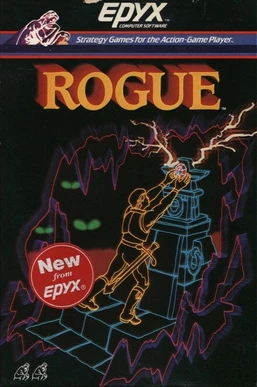
Rogue[1] appeared in 1980 on BSD[2] Unix. It was among the first
games to generate its dungeon procedurally — every run a different layout,
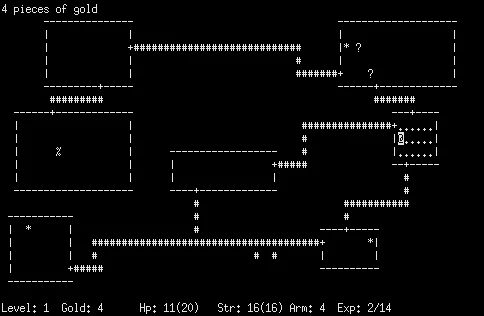
every descent into the unknown genuinely unknown. It had no graphics.
Your character was @. A dog was d. A dragon was D. The walls
were # and the doors were + and the gold was *. The terminal was
not a window into a game engine running somewhere else. The terminal
was the renderer, the I/O layer, and the display, all at once. Every
frame was a text buffer written to a screen.
NetHack[3][4][5] is Rogue's direct descendant. First released in 1987. It is still actively maintained today. It runs in any modern terminal — the same kind of terminal you are about to open for the first time.
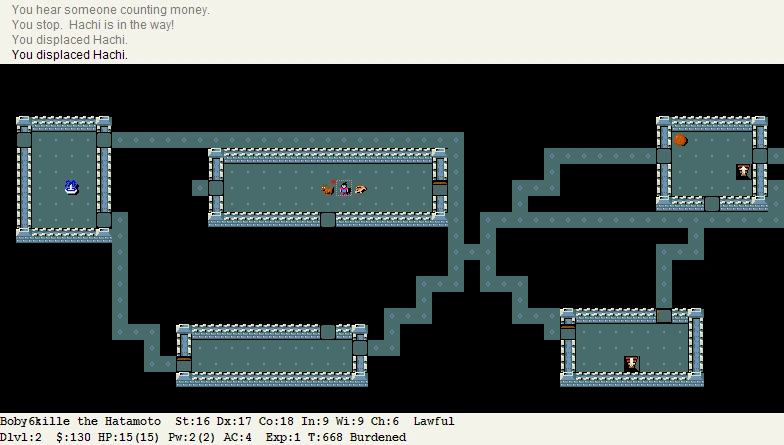
This chapter ends with you installing NetHack and playing for ten minutes. Not as a reward. As a demonstration. The terminal is not a chore you clear on the way to the real work. It is the environment that ran the first procedurally generated game, and it still does. Learn it for what it is.
The implementation pages take you through the same environment, one skill at a time — the shell prompt, navigation, files, permissions, search, pipelines, text tools, processes, the shell environment, scripting, and Vim. Each page builds on the last. By the end you will have a working command-line setup and NetHack installed. Start at Setup.
Learning the Shell
I opened a terminal for the first time and typed ls. The machine
listed the files in my home directory. I typed cd Documents and it
moved me there. I thought: is that it? It was not.
There were two things in front of me, not one. The window I had opened
was the terminal emulator — it draws text and captures keystrokes.
Inside it, a program is running: the shell. On most Linux systems that
is Bash, and it is Bash that reads commands and runs them. The
prompt — user@hostname:~/path$ — tells me who I am, where I am, and
what kind of access I have. The $ means regular user. The # means
root.
The filesystem is a tree and I am always standing somewhere in it.
pwd tells me where. ls tells me what is there. cd moves me.
The first time I used a terminal I ran cd a dozen times in a row,
lost track of where I was, and typed ls expecting to recognise
something. I did not. The fix is always the same: pwd. When I am
confused, pwd tells me where I am. Then ls. Those two commands
together are my compass.
I create files with touch, read short ones with cat, page through
longer ones with less. I copy with cp, move and rename with mv.
Then there is rm. There is no trash. There is no undo. I ran rm -r
on the wrong directory once, early in a project. An hour of work, gone
in 40 milliseconds. The lesson: read the command before pressing Enter.
Every time. Without exception.
Every file has an owner, a group, and a permission set: read, write,
execute, for three audiences — owner, group, everyone else. chmod 755 script.sh gives the owner full access and lets everyone else read
and execute the file. chown user:group file changes ownership. The principle of
least privilege applies here the same way it applies to root: I give a
file only the permissions it actually needs.
Two tools handle everything I have ever needed to find. grep searches
inside files — a pattern, a function name, an error string. find
searches the filesystem by name, type, or modification time. The
combination is what I actually use: find . -name '*.c' | xargs grep 'malloc' — find every C source file and search each one for a function
call. It is how I navigate codebases I did not write.
Once I could find text, I needed to reshape it. sort reorders lines.
uniq removes consecutive duplicates — sort first or it does nothing.
wc -l counts them. cut extracts fields from structured output:
cut -d: -f1 /etc/passwd prints every username. sed substitutes in
a stream without opening an editor: sed 's/ERROR/WARN/g' rewrites
every match in one pass. Each tool does one thing. Pipes connect them.
Unix programs are designed to do one thing well and to compose with
other programs that do the same. The pipe | connects them: the stdout
of the left process becomes the stdin of the right, and both run
concurrently. > redirects stdout into a file, truncating it. >>
appends. 2> redirects stderr. These are not tricks — they are the
architecture. I built the internals of | from scratch in
c05.
A & at the end of a command runs it in the background and returns the
prompt immediately. jobs shows what is running. fg brings a job
back to the foreground. Ctrl-C stops the foreground process. kill PID sends SIGTERM — a request to exit. kill -9 PID sends SIGKILL —
the kernel terminates it, no negotiation. Exit codes tie it together:
every process exits with a number, 0 means success, and && runs the
next command only if the last one succeeded.
The shell maintains a set of named values that every process it spawns
can read. $PATH is the most important: the list of directories the
shell searches when I type a command. export MY_VAR=value makes a
variable available to child processes. Adding the export to ~/.bashrc
makes it survive reboots. The C programs I wrote in the chapters that
followed read environment variables this way — getenv("DEBUG") — and
by then I already knew where they came from.
Shell scripts are programs. The shebang (#!/bin/bash) tells the
kernel which interpreter to run. After that, variables, conditionals,
loops, and exit codes work exactly as they do in C — the syntax is
just different. The scripts I write to automate builds, run testers,
and manage files are the same mechanism that ships software in
production. I was writing real tools from the first script.
Eventually I was logged into a server over SSH with no GUI, a config
file needed editing, and vi was the only editor available. vi is
part of the POSIX[6] standard — every Unix system is required to have it.
It is modal: i to insert, Esc to return to normal mode, :wq to
save and quit, :q! to abandon everything and get out. That is all I
needed to not be stuck. When I wanted more, vimtutor was built into
Vim and took thirty minutes.
sudo apt install nethack-console — see Setup for other platforms.
Then nethack. The terminal cleared. A map appeared in ASCII. I was
@. The level is procedurally generated — every run different, every
descent unknown. I died. Probably quickly. That is the format. What was
on the screen is the same text-buffer rendering mechanism that ran Rogue
in 1980. In a few chapters it ran my raycaster. Eventually, a 3D engine
on Dreamcast hardware. The tool had not changed. What I did with it had.
The Project
Set up a working command-line environment and complete the following:
- Navigate a multi-level directory tree without a file manager or GUI
- Create, copy, move, and delete files and directories using only shell commands
- Write a shell script, set the execute bit with
chmod, and run it - Use
grepto search for a pattern inside files, andfindto locate files by name and type - Chain at least three commands together with pipes; redirect output
to a file with
>and append with>> - Run a command in the background with
&, confirm it withjobs, bring it back withfg, and kill a process by PID - Set a custom environment variable in
~/.bashrcand confirm it persists in a new shell session - Perform a text substitution in a file using vim or sed
- Install NetHack and launch it
No deliverable file. The tester checks the results directly.
The Tester
Ships in thecodingidiot-com/f01-the-terminal as test.sh.
The script creates a scratch directory with a known file and directory
structure and issues eleven challenges in sequence. Each check prints
PASS or FAIL with a brief explanation; the tester advances to the
next challenge on a pass.
- Navigate to a known subdirectory and create a file there.
- Copy, rename, and delete files.
- Write a shell script with a shebang, make it executable with
chmod, and run it — output verified. - Filter a log file with
grepand redirect the result. - Locate files by name with
findand redirect a sorted list. - Chain
grep,sort, anduniqin a pipeline and redirect output. - Append a line to an existing file with
>>. - Kill a background process by PID. The tester spawns the process and
verifies it is gone. Confirming with
jobsand returning it withfgare self-certified — they require an interactive session. - Export a variable in
~/.bashrc; verified in a new shell session. - Replace a word in a file using vim or sed.
command -v nethack— NetHack installed and in PATH.
The script cleans up the scratch directory on a completed run. No third-party test frameworks. Pure Bash.